
KID TALK FAQS
Kid Talk FAQs
Last Updated: October 30, 2026
Add KidTalk
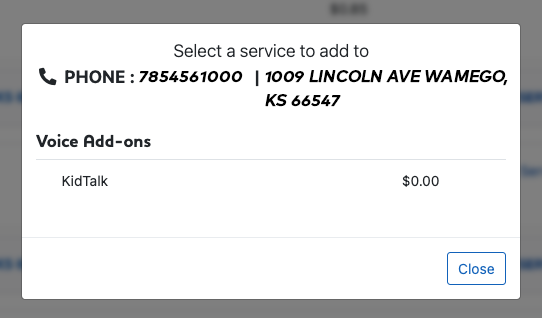
Log into myWTC and select the phone line you'd like to manage. Click Add Service, then choose KidTalk under the Voice Add-ons section.
Configure Numbers
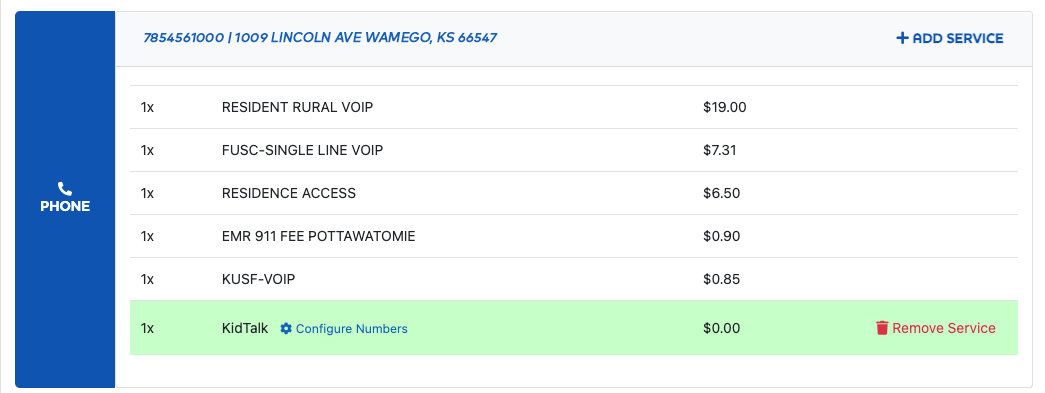
Once KidTalk has been added, click Configure Numbers to add up to 10 approved phone numbers that this phone line is allowed to call.
Manage KidTalk
KidTalk will appear with your phone services. You can update approved phone numbers or remove the service anytime through the myWTC portal.
.png)
Frequently Asked Questions
KidTalk is a free WTC Phone feature that allows children to only call approved phone numbers while blocking all other outgoing calls.
KidTalk is perfect for younger children, after-school communication, or families who want a safe alternative before giving their child a smartphone.
You can add up to 10 approved phone numbers.
Yes. You can update your approved phone numbers anytime through the myWTC portal.
KidTalk is completely free with your WTC Phone service.
Simply log into your myWTC account, add KidTalk under Voice Add-ons, and configure the approved phone numbers you'd like your child to call.